


AccuWeather: Weather Radar
3.5358.46K Reviews
App Specs
- Version
- Varies with Device
- Updated On
- License
- Free
- Downloads
- 100,000,000+
- Developer
- AccuWeather
- Categories
- Weather
- Platform
- Android, iOS
Screenshots
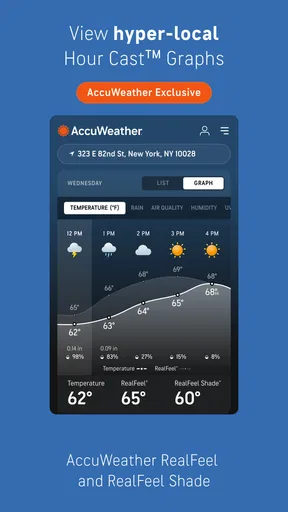
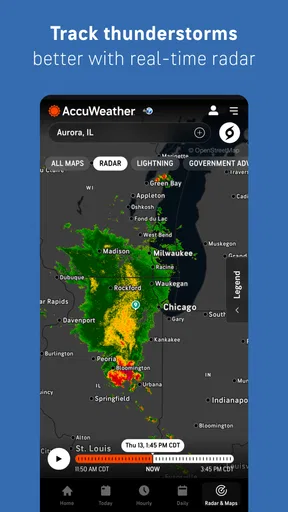
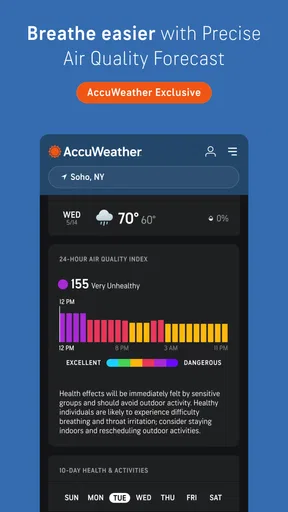
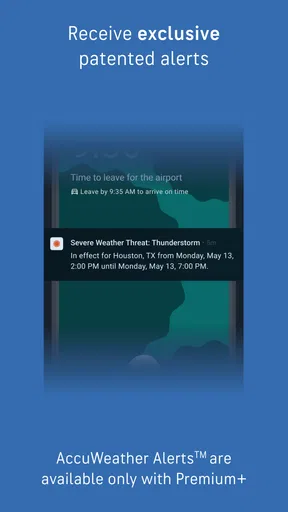
 Analysis by AppCompare
I judge a weather app less by how many screens it offers than by whether it helps me make a decision at the right moment: take a jacket, change a route, or postpone an outdoor plan. AccuWeather: Weather Radar is aimed at that everyday check-in, with extra depth for people who like to watch conditions develop. It is a free weather app from AccuWeather, rated for Everyone, and it has an average rating of 3.5 from around 2.6 million ratings, with more than 100 million installs. That scale makes it familiar to many users, but it does not mean every forecast will suit every place or every person.
Choose it for the decisions you actually make
Before switching weather apps, I would ask what I need most. If I only want a quick temperature glance, the default weather app already on my phone may be enough. If I regularly need to judge whether rain is approaching, follow a storm, or check several places, a dedicated app like this has more reason to earn a place on my home screen. The useful test is not whether it contains lots of weather information, but whether its forecast and map help answer the question I have in front of me.
I find radar most useful as a planning aid, not a promise. A map can show a band of precipitation moving toward an area, but local conditions and timing can shift, so I still leave a little margin before committing to a long walk or an outdoor appointment. That habit matters especially when the weather is changing quickly: check the broader pattern, then check again nearer the time rather than treating one look as a guarantee.
Guides and Analysis on AccuWeather: Weather Radar
Features That Stand Out
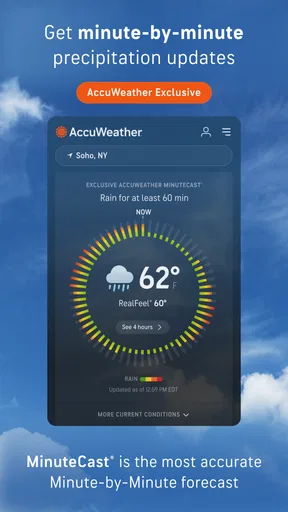
First things first, the highlight of AccuWeather: Weather Radar is its MinuteCast feature. This little gem offers minute-by-minute precipitation forecasts for up to four hours ahead. It’s pretty spot-on, which means no more unexpected dashes to shelter when you’re caught in a sudden downpour. I mean, who doesn’t love a heads-up, right?
For a practical routine, I would use that short-range view right before leaving home, rather than relying on it to plan an entire day. If rain is nearby, a quick refresh before walking the dog, cycling to a station, or carrying groceries can help me decide whether to wait or take a cover. The trade-off is that highly local, minute-level guidance is best treated as an estimate; I would not build a high-stakes schedule around a precise arrival time for rain.
Another cool feature is the interactive radar map. You can zoom in and out to see detailed weather patterns in your area or even across the world. It’s like having a mini weather station right in your pocket. You’ll find this especially useful if you’re planning a trip or if you’re just a bit nosy about what’s happening with the weather elsewhere.
One less obvious way to get value from the map is to zoom out before zooming in. Seeing the wider system first can help distinguish a passing patch from a larger weather pattern, while the close view is better for deciding whether conditions near your route look different from those at home. When checking a destination, I would compare the local forecast there with the radar picture rather than assuming the weather where I am tells me what to expect somewhere else.
Worth Reading Before You Choose

Flipboard Shows What News Apps Must Do Beyond the Feed

Switching to Android Auto Means Rethinking Your Driving Routine

Google Calendar Makes a Crowded Week Easier to Manage

Ludo King Makes the Most of the Minutes Between Plans

Baby Panda World Brings Quick Play to Modern Phones, but Its Game Library Feels Busy

ESPN’s Live Game View Makes Following Close Games Easier
User Experience and Interface
The app’s interface is super user-friendly. I appreciate how everything is laid out in a way that’s easy to digest, even if you’re half-awake in the morning. The navigation is smooth, and the transition between screens is seamless. Plus, it doesn’t bombard you with ads, which is always a plus in my book.
For a newcomer, I would start with one home location and add other places only if there is a recurring reason, such as checking on family or keeping an eye on a regular destination. That keeps a quick glance useful instead of turning it into a list to scroll through. If the app becomes part of a morning routine, I would also decide which information I actually look at; otherwise, extra screens can make a simple question feel like homework.
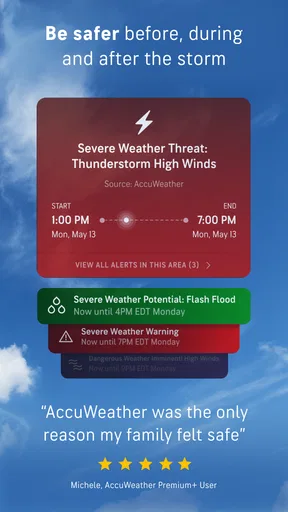
It is also worth deciding how much interruption you want from weather alerts. Severe-weather warnings can be valuable when you are away from a window or focused on something else, but frequent notifications can become easy to dismiss if they are not relevant to your routine. I would keep the alerts that could change a real decision and review the settings if they start feeling noisy. A warning is most useful when I notice it and understand what action I might take.
Accuracy and Reliability
In terms of accuracy, I’ve found AccuWeather to be incredibly reliable. The forecasts are consistently accurate, and the updates happen frequently enough to keep you informed without being overwhelming. Whether it’s planning a weekend picnic or deciding on the right time for a morning jog, this app has got your back.
My confidence in any forecast depends on the question and the time horizon. A broad outlook is handy for choosing which day to plan around, while a near-term check is more relevant when I am about to head outside. For a picnic, I would look at the expected conditions early, then revisit them on the day; for a jog, I would check closer to departure. This is not a flaw unique to this app so much as a sensible way to use changing weather information.
I've tested it against a few other apps, and it holds its ground quite well. It’s reassuring to know that the forecast I’m reading is backed by a reputable source with years of experience in the weather biz.
When comparing it with the usual alternatives, I see three broad choices. A phone’s built-in weather view is often the simplest option for a fast glance. A map-focused weather tool may suit someone who wants to study conditions visually, while a local or national weather service can be a better fit for people who prioritize official regional warnings and guidance. I would compare the information that matters in my own area rather than assume one provider wins everywhere; terrain and local weather patterns can make the experience feel different from one place to another.
Cost, switching, and everyday fit
The app is free to download, with in-app purchases ranging from $0.99 to $29.99 per item. I would begin with the free experience and only consider paying if I can identify a specific feature or change that would improve my routine. That is a better test than upgrading simply because a screen or offer appears. If you are comparing it with another app, try both for the same kind of decision—such as checking the rain before a commute—before deciding whether a paid option is worthwhile for you.
Switching is easy if you only want to replace a basic glance at the weather, but habits matter more than installation. You may need to choose your locations again and decide which alerts you want, then give yourself a few days to learn where the forecast and radar views fit into your routine. I would avoid keeping several apps’ notifications active at once: competing alerts can create more noise than confidence. Keep the source you actually check, and use a second one when you have a clear reason to cross-check.
This is a strong fit for someone who checks the weather before walking, commuting, exercising outdoors, or arranging plans that depend on rain. It can also help people who want a quick visual sense of conditions beyond their immediate neighborhood. It is less compelling if all you need is a temperature on your home screen, if you dislike notifications and will not adjust them, or if your main requirement is guidance from a particular official local source. In those cases, a simpler built-in forecast or a regional service may feel more direct.
Final Thoughts
So, is AccuWeather: Weather Radar worth your time? Absolutely. It’s a comprehensive, easy-to-use app that offers precise weather forecasts and real-time alerts. Whether you’re a weather enthusiast or just someone who wants to avoid getting drenched, this app is a solid choice. Go ahead, give it a whirl, and let the skies be your guide!
My recommendation is to try it as a practical planning tool rather than expect it to eliminate uncertainty. On a weekday morning, I might check the outlook before leaving, use the radar to see whether rain is approaching along the way, and take one last look before heading out if the sky has changed. That small workflow is where the app makes sense to me: enough detail to inform a choice without requiring me to monitor weather all day.
AccuWeather is a sensible pick if its mix of forecast, radar, and alerts matches how you make plans. The average rating of 3.5 reflects a mixed overall reception, so I would not assume every user will find the same accuracy or experience in every location. Since the app is free to start and rated for Everyone, trying it is a low-commitment way to see whether its presentation works for you. Keep it if it earns a regular place in your routine; choose a simpler or more locally focused alternative if that better answers the weather questions you actually have.
Pros
- Accurate and up-to-date forecasts.
- Detailed radar maps for precise tracking.
- Customizable alerts for severe weather.
- User-friendly interface with easy navigation.
- Provides global weather coverage.
Cons
- Ads can be intrusive and distracting.
- Some features require a premium subscription.
- Occasional issues with location accuracy.
- Radar maps can be slow to load.
- Limited customization for widget display.
FAQs for AccuWeather: Weather Radar
What features does AccuWeather: Weather Radar offer?
AccuWeather provides a comprehensive suite of features including minute-by-minute weather updates, accurate forecasts up to 45 days ahead, and detailed radar maps. The app also offers severe weather alerts, live radar updates, and customizable weather widgets, all designed to keep users informed and prepared for any weather changes.
Is AccuWeather's forecast accuracy reliable?
AccuWeather is renowned for its high level of forecast accuracy. It uses advanced technology and a vast network of meteorologists to provide precise weather predictions. Users often find the minute-by-minute precipitation forecasts and severe weather alerts particularly reliable, making it a trusted choice for planning outdoor activities.
Does AccuWeather require a subscription for full access?
AccuWeather offers both free and premium versions. While the free version includes essential features like forecasts and radar maps, the premium version, AccuWeather Platinum, provides an ad-free experience and additional features such as extended forecasts and enhanced radar capabilities. Subscriptions are optional but enhance the app's functionality.
How user-friendly is the AccuWeather app?
AccuWeather is designed with user-friendliness in mind. The interface is intuitive, making it easy to navigate through features such as hourly forecasts, radar maps, and weather alerts. The app provides a seamless experience for both new and experienced users, with customizable settings to tailor the information to individual needs.
Can AccuWeather be used internationally?
Yes, AccuWeather is available for use worldwide. It provides localized weather forecasts and alerts for over 3 million locations globally. Whether you're traveling abroad or checking weather conditions back home, AccuWeather ensures that users receive accurate and localized weather data no matter where they are.


